redis

推荐列表 站点导航

当前位置:首页 > 数据库 > redis >

Windows下Redis的安装使用教程

来源:网络整理  作者:fen  发布时间:2020-12-25 03:02
这篇文章主要以图文结合的方式为大家详细介绍了Windows下Redis的安装使用,Redis的出现,很大程度补偿了memcached这类...

一、下载Redis for windows

在网络中搜索Redis fow windows,就可以下载Redis的压缩包。解压包。

Windows下Redis的安装使用教程

会发现其中有32位和64位的不同版本的包,根据需要,使用对应的压缩包即可。

二、解压

我使用的是redisbin_x64.zip的压缩包,将其解压到redis的文件夹中。

Windows下Redis的安装使用教程

解压之后,会发现内容只有一些.exe的文件。到这里,redis就算做好了一半了。

三、配置

在redis下新建一个conf的文件夹,并创建 redis.conf 文本文件。将一下内容复制到配置文件中。

# Redis configuration file example  


# By default Redis does not run as a daemon. Use 'yes' if you need it.  

# Note that Redis will write a pid file in /var/run/redis.pid when daemonized.  

# 是否以后台进程的形式运行,默认为no  

daemonize no  


# When run as a daemon, Redis write a pid file in /var/run/redis.pid by default.  

# You can specify a custom pid file location here.  

# 如果指定以后台形式执行,则需要指定一个pid文件  

pidfile /var/run/redis.pid  


# Accept connections on the specified port, default is 6379  

#监听端口号  

port 6379  


# If you want you can bind a single interface, if the bind option is not  

# specified all the interfaces will listen for connections.  

# 绑定主机IP  

# bind 127.0.0.1  


# Close the connection after a client is idle for N seconds (0 to disable)  

# 客户端空闲超时时间,设置为0,则没有超时。过了空闲时间,则会将客户端的连接关闭  

timeout 300  


# Set server verbosity to 'debug'  

# it can be one of:  

# debug (a lot of information, useful for development/testing)  

# notice (moderately verbose, what you want in production probably)  

# warning (only very important / critical messages are logged)  

# 日志记录等级  

loglevel debug  


# Specify the log file name. Also 'stdout' can be used to force  

# the demon to log on the standard output. Note that if you use standard  

# output for logging but daemonize, logs will be sent to /dev/null  

# 日志记录方式  

logfile stdout  


# Set the number of databases. The default database is DB 0, you can select  

# a different one on a per-connection basis using SELECT <dbid> where  

# dbid is a number between 0 and 'databases'-1  

# 可用数据库数目  

databases 16  


################################ SNAPSHOTTING #################################  


# Save the DB on disk:  


# save <seconds> <changes>  


# Will save the DB if both the given number of seconds and the given  

# number of write operations against the DB occurred.  


# In the example below the behaviour will be to save:  

# after 900 sec (15 min) if at least 1 key changed  

# after 300 sec (5 min) if at least 10 keys changed  

# after 60 sec if at least 10000 keys changed  

save 900 1  

save 300 10  

save 60 10000  


# Compress string objects using LZF when dump .rdb databases?  

# For default that's set to 'yes' as it's almost always a win.  

# If you want to save some CPU in the saving child set it to 'no' but  

# the dataset will likely be bigger if you have compressible values or keys.  

# 存储到本地数据库时,是否需要压缩数据  

rdbcompression yes  


# The filename where to dump the DB  

#本地数据名称  

dbfilename dump.rdb  


# For default save/load DB in/from the working directory  

# Note that you must specify a directory not a file name.  

# 本地数据库存放路径  

dir ./  


################################# REPLICATION #################################  


# Master-Slave replication. Use slaveof to make a Redis instance a copy of  

# another Redis server. Note that the configuration is local to the slave  

# so for example it is possible to configure the slave to save the DB with a  

# different interval, or to listen to another port, and so on.  

# 当该服务为从服务时,设置主服务的ip地址和端口号  


# slaveof <masterip> <masterport>  


# If the master is password protected (using the "requirepass" configuration  

# directive below) it is possible to tell the slave to authenticate before  

# starting the replication synchronization process, otherwise the master will  

# refuse the slave request.  

# 当该服务为从服务时,设置主服务的连接密码  


# masterauth <master-password>  


################################## SECURITY ###################################  


# Require clients to issue AUTH <PASSWORD> before processing any other  

# commands. This might be useful in environments in which you do not trust  

# others with access to the host running redis-server.  


# This should stay commented out for backward compatibility and because most  

# people do not need auth (e.g. they run their own servers).  

# 连接密码  


# requirepass foobared  


################################### LIMITS ####################################  


# Set the max number of connected clients at the same time. By default there  

# is no limit, and it's up to the number of file descriptors the Redis process  

# is able to open. The special value '0' means no limts.  

# Once the limit is reached Redis will close all the new connections sending  

# an error 'max number of clients reached'.  

# 最大客户端连接数,默认不设置  


# maxclients 128  


# Don't use more memory than the specified amount of bytes.  

# When the memory limit is reached Redis will try to remove keys with an  

# EXPIRE set. It will try to start freeing keys that are going to expire  

# in little time and preserve keys with a longer time to live.  

# Redis will also try to remove objects from free lists if possible.  


# If all this fails, Redis will start to reply with errors to commands  

# that will use more memory, like SET, LPUSH, and so on, and will continue  

# to reply to most read-only commands like GET.  


# WARNING: maxmemory can be a good idea mainly if you want to use Redis as a  

# 'state' server or cache, not as a real DB. When Redis is used as a real  

# database the memory usage will grow over the weeks, it will be obvious if  

# it is going to use too much memory in the long run, and you'll have the time  

# to upgrade. With maxmemory after the limit is reached you'll start to get  

# errors for write operations, and this may even lead to DB inconsistency.  

# 设置最大内存,达到最大内存设置后,Redis线尝试清楚已到期或即将到期的key,当此方法处理后,达到最大内存设置,将不能在进行写入操作。  


# maxmemory <bytes>  


############################## APPEND ONLY MODE ###############################  


# By default Redis asynchronously dumps the dataset on disk. If you can live  

# with the idea that the latest records will be lost if something like a crash  

# happens this is the preferred way to run Redis. If instead you care a lot  

# about your data and don't want to that a single record can get lost you should  

# enable the append only mode: when this mode is enabled Redis will append  

# every write operation received in the file appendonly.log. This file will  

# be read on startup in order to rebuild the full dataset in memory.  


# Note that you can have both the async dumps and the append only file if you  

# like (you have to comment the "save" statements above to disable the dumps).  

# Still if append only mode is enabled Redis will load the data from the  

# log file at startup ignoring the dump.rdb file.  


# The name of the append only file is "appendonly.log"  


# IMPORTANT: Check the BGREWRITEAOF to check how to rewrite the append  

# log file in background when it gets too big.  

# 设置Redis服务器在每次操作完成后,是否更新日志操作,如果关闭,可能会在断电时导致一段时间内的数据丢失,  

# 因为Redis本身同步数据文件是按照上面的save条件来同步的,所以有的数据会在一段时间内存储于内存中。  


appendonly no  


# 更新日志文件名  

# appendfilename appendonly.aof  


# The fsync() call tells the Operating System to actually write data on disk  

# instead to wait for more data in the output buffer. Some OS will really flush  

# data on disk, some other OS will just try to do it ASAP.  


# Redis supports three different modes:  


# no: don't fsync, just let the OS flush the data when it wants. Faster.  

# always: fsync after every write to the append only log . Slow, Safest.  

# everysec: fsync only if one second passed since the last fsync. Compromise.  


# The default is "always" that's the safer of the options. It's up to you to  

# understand if you can relax this to "everysec" that will fsync every second  

# or to "no" that will let the operating system flush the output buffer when  

# it want, for better performances (but if you can live with the idea of  

# some data loss consider the default persistence mode that's snapshotting).  

# 更新日志条件,有三个可选值:  


appendfsync always  

# appendfsync everysec  

# appendfsync no  


############################### ADVANCED CONFIG ###############################  


# Glue small output buffers together in order to send small replies in a  

# single TCP packet. Uses a bit more CPU but most of the times it is a win  

# in terms of number of queries per second. Use 'yes' if unsure.  

#glueoutputbuf yes  


# Use object sharing. Can save a lot of memory if you have many common  

# string in your dataset, but performs lookups against the shared objects  

# pool so it uses more CPU and can be a bit slower. Usually it's a good  

# idea.  


# When object sharing is enabled (shareobjects yes) you can use  

# shareobjectspoolsize to control the size of the pool used in order to try  

# object sharing. A bigger pool size will lead to better sharing capabilities.  

# In general you want this value to be at least the double of the number of  

# very common strings you have in your dataset.  


# WARNING: object sharing is experimental, don't enable this feature  

# in production before of Redis 1.0-stable. Still please try this feature in  

# your development environment so that we can test it better.  


# shareobjects no  

# shareobjectspoolsize 1024  


# 是否使用虚拟内存  

#vm-enabled no;  


# 虚拟内存文件路径,不能多个redis共享  

# vm-swap-file /tmp/redis.swap  


# 将所有大于vm-max-memory 的数据存入虚拟内存。无论vm-max-memory值大小,所有的索引数据都是内存数据。  

# 如果将vm-max-memory设置为0,则所有的数据都存放在磁盘。  

# vm-max-memory 0  

四、启动redis服务器

使用一下命令启动 redis服务器。

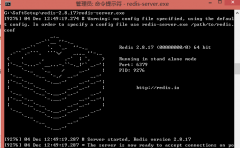
redis-server.exe conf/redis.conf

启动成功之后,你会看到如下的提示:

Windows下Redis的安装使用教程

五、连接redis服务器

使用redis自带的命令,能够连接服务器。

redis-cli.exe -h localhost -p 6379

连接成功之后,会提示以下内容:

Windows下Redis的安装使用教程

这个时候,你就能够使用redis的一下指令操作数据。其他指令,请在网上具体查看一下。

相关热词: windows 教程 安装

本站内容来源于网络,如有侵权请与我们联系,我们会及时删除,我们深感抱歉!
注:本站所有信息仅供用于网络技术学习参考,学习中请遵循相关法律法规!

本文地址: https://v30.fanwenzhu.com/sql/redis/8752.shtml

最新文章
详解Redis的慢查询日志 详解Redis的慢查询日志

时间:2020-12-28

如何高效使用Redis作为LR 如何高效使用Redis作为LR

时间:2020-12-28

WINDOWS中REDIS主从配置实现 WINDOWS中REDIS主从配置实现

时间:2020-12-28

redis单线程快的原因和原理 redis单线程快的原因和原理

时间:2020-12-25

Windows操作系统下Redis服务 Windows操作系统下Redis服务

时间:2020-12-25

Windows下Redis安装配置简单 Windows下Redis安装配置简单

时间:2020-12-25

Redis安装教程图解 Redis安装教程图解

时间:2020-12-25

Windows下Redis的安装使用教 Windows下Redis的安装使用教

时间:2020-12-25

Copyright © www.juheyunku.com      关于 | 合作 | 声明 | 联系 | 更新 | 地图 | Tags

Windows下Redis的安装使用教程

2020-12-25 编辑:fen

一、下载Redis for windows

在网络中搜索Redis fow windows,就可以下载Redis的压缩包。解压包。

Windows下Redis的安装使用教程

会发现其中有32位和64位的不同版本的包,根据需要,使用对应的压缩包即可。

二、解压

我使用的是redisbin_x64.zip的压缩包,将其解压到redis的文件夹中。

Windows下Redis的安装使用教程

解压之后,会发现内容只有一些.exe的文件。到这里,redis就算做好了一半了。

三、配置

在redis下新建一个conf的文件夹,并创建 redis.conf 文本文件。将一下内容复制到配置文件中。

# Redis configuration file example  


# By default Redis does not run as a daemon. Use 'yes' if you need it.  

# Note that Redis will write a pid file in /var/run/redis.pid when daemonized.  

# 是否以后台进程的形式运行,默认为no  

daemonize no  


# When run as a daemon, Redis write a pid file in /var/run/redis.pid by default.  

# You can specify a custom pid file location here.  

# 如果指定以后台形式执行,则需要指定一个pid文件  

pidfile /var/run/redis.pid  


# Accept connections on the specified port, default is 6379  

#监听端口号  

port 6379  


# If you want you can bind a single interface, if the bind option is not  

# specified all the interfaces will listen for connections.  

# 绑定主机IP  

# bind 127.0.0.1  


# Close the connection after a client is idle for N seconds (0 to disable)  

# 客户端空闲超时时间,设置为0,则没有超时。过了空闲时间,则会将客户端的连接关闭  

timeout 300  


# Set server verbosity to 'debug'  

# it can be one of:  

# debug (a lot of information, useful for development/testing)  

# notice (moderately verbose, what you want in production probably)  

# warning (only very important / critical messages are logged)  

# 日志记录等级  

loglevel debug  


# Specify the log file name. Also 'stdout' can be used to force  

# the demon to log on the standard output. Note that if you use standard  

# output for logging but daemonize, logs will be sent to /dev/null  

# 日志记录方式  

logfile stdout  


# Set the number of databases. The default database is DB 0, you can select  

# a different one on a per-connection basis using SELECT <dbid> where  

# dbid is a number between 0 and 'databases'-1  

# 可用数据库数目  

databases 16  


################################ SNAPSHOTTING #################################  


# Save the DB on disk:  


# save <seconds> <changes>  


# Will save the DB if both the given number of seconds and the given  

# number of write operations against the DB occurred.  


# In the example below the behaviour will be to save:  

# after 900 sec (15 min) if at least 1 key changed  

# after 300 sec (5 min) if at least 10 keys changed  

# after 60 sec if at least 10000 keys changed  

save 900 1  

save 300 10  

save 60 10000  


# Compress string objects using LZF when dump .rdb databases?  

# For default that's set to 'yes' as it's almost always a win.  

# If you want to save some CPU in the saving child set it to 'no' but  

# the dataset will likely be bigger if you have compressible values or keys.  

# 存储到本地数据库时,是否需要压缩数据  

rdbcompression yes  


# The filename where to dump the DB  

#本地数据名称  

dbfilename dump.rdb  


# For default save/load DB in/from the working directory  

# Note that you must specify a directory not a file name.  

# 本地数据库存放路径  

dir ./  


################################# REPLICATION #################################  


# Master-Slave replication. Use slaveof to make a Redis instance a copy of  

# another Redis server. Note that the configuration is local to the slave  

# so for example it is possible to configure the slave to save the DB with a  

# different interval, or to listen to another port, and so on.  

# 当该服务为从服务时,设置主服务的ip地址和端口号  


# slaveof <masterip> <masterport>  


# If the master is password protected (using the "requirepass" configuration  

# directive below) it is possible to tell the slave to authenticate before  

# starting the replication synchronization process, otherwise the master will  

# refuse the slave request.  

# 当该服务为从服务时,设置主服务的连接密码  


# masterauth <master-password>  


################################## SECURITY ###################################  


# Require clients to issue AUTH <PASSWORD> before processing any other  

# commands. This might be useful in environments in which you do not trust  

# others with access to the host running redis-server.  


# This should stay commented out for backward compatibility and because most  

# people do not need auth (e.g. they run their own servers).  

# 连接密码  


# requirepass foobared  


################################### LIMITS ####################################  


# Set the max number of connected clients at the same time. By default there  

# is no limit, and it's up to the number of file descriptors the Redis process  

# is able to open. The special value '0' means no limts.  

# Once the limit is reached Redis will close all the new connections sending  

# an error 'max number of clients reached'.  

# 最大客户端连接数,默认不设置  


# maxclients 128  


# Don't use more memory than the specified amount of bytes.  

# When the memory limit is reached Redis will try to remove keys with an  

# EXPIRE set. It will try to start freeing keys that are going to expire  

# in little time and preserve keys with a longer time to live.  

# Redis will also try to remove objects from free lists if possible.  


# If all this fails, Redis will start to reply with errors to commands  

# that will use more memory, like SET, LPUSH, and so on, and will continue  

# to reply to most read-only commands like GET.  


# WARNING: maxmemory can be a good idea mainly if you want to use Redis as a  

# 'state' server or cache, not as a real DB. When Redis is used as a real  

# database the memory usage will grow over the weeks, it will be obvious if  

# it is going to use too much memory in the long run, and you'll have the time  

# to upgrade. With maxmemory after the limit is reached you'll start to get  

# errors for write operations, and this may even lead to DB inconsistency.  

# 设置最大内存,达到最大内存设置后,Redis线尝试清楚已到期或即将到期的key,当此方法处理后,达到最大内存设置,将不能在进行写入操作。  


# maxmemory <bytes>  


############################## APPEND ONLY MODE ###############################  


# By default Redis asynchronously dumps the dataset on disk. If you can live  

# with the idea that the latest records will be lost if something like a crash  

# happens this is the preferred way to run Redis. If instead you care a lot  

# about your data and don't want to that a single record can get lost you should  

# enable the append only mode: when this mode is enabled Redis will append  

# every write operation received in the file appendonly.log. This file will  

# be read on startup in order to rebuild the full dataset in memory.  


# Note that you can have both the async dumps and the append only file if you  

# like (you have to comment the "save" statements above to disable the dumps).  

# Still if append only mode is enabled Redis will load the data from the  

# log file at startup ignoring the dump.rdb file.  


# The name of the append only file is "appendonly.log"  


# IMPORTANT: Check the BGREWRITEAOF to check how to rewrite the append  

# log file in background when it gets too big.  

# 设置Redis服务器在每次操作完成后,是否更新日志操作,如果关闭,可能会在断电时导致一段时间内的数据丢失,  

# 因为Redis本身同步数据文件是按照上面的save条件来同步的,所以有的数据会在一段时间内存储于内存中。  


appendonly no  


# 更新日志文件名  

# appendfilename appendonly.aof  


# The fsync() call tells the Operating System to actually write data on disk  

# instead to wait for more data in the output buffer. Some OS will really flush  

# data on disk, some other OS will just try to do it ASAP.  


# Redis supports three different modes:  


# no: don't fsync, just let the OS flush the data when it wants. Faster.  

# always: fsync after every write to the append only log . Slow, Safest.  

# everysec: fsync only if one second passed since the last fsync. Compromise.  


# The default is "always" that's the safer of the options. It's up to you to  

# understand if you can relax this to "everysec" that will fsync every second  

# or to "no" that will let the operating system flush the output buffer when  

# it want, for better performances (but if you can live with the idea of  

# some data loss consider the default persistence mode that's snapshotting).  

# 更新日志条件,有三个可选值:  


appendfsync always  

# appendfsync everysec  

# appendfsync no  


############################### ADVANCED CONFIG ###############################  


# Glue small output buffers together in order to send small replies in a  

# single TCP packet. Uses a bit more CPU but most of the times it is a win  

# in terms of number of queries per second. Use 'yes' if unsure.  

#glueoutputbuf yes  


# Use object sharing. Can save a lot of memory if you have many common  

# string in your dataset, but performs lookups against the shared objects  

# pool so it uses more CPU and can be a bit slower. Usually it's a good  

# idea.  


# When object sharing is enabled (shareobjects yes) you can use  

# shareobjectspoolsize to control the size of the pool used in order to try  

# object sharing. A bigger pool size will lead to better sharing capabilities.  

# In general you want this value to be at least the double of the number of  

# very common strings you have in your dataset.  


# WARNING: object sharing is experimental, don't enable this feature  

# in production before of Redis 1.0-stable. Still please try this feature in  

# your development environment so that we can test it better.  


# shareobjects no  

# shareobjectspoolsize 1024  


# 是否使用虚拟内存  

#vm-enabled no;  


# 虚拟内存文件路径,不能多个redis共享  

# vm-swap-file /tmp/redis.swap  


# 将所有大于vm-max-memory 的数据存入虚拟内存。无论vm-max-memory值大小,所有的索引数据都是内存数据。  

# 如果将vm-max-memory设置为0,则所有的数据都存放在磁盘。  

# vm-max-memory 0  

四、启动redis服务器

使用一下命令启动 redis服务器。

redis-server.exe conf/redis.conf

启动成功之后,你会看到如下的提示:

Windows下Redis的安装使用教程

五、连接redis服务器

使用redis自带的命令,能够连接服务器。

redis-cli.exe -h localhost -p 6379

连接成功之后,会提示以下内容:

Windows下Redis的安装使用教程

这个时候,你就能够使用redis的一下指令操作数据。其他指令,请在网上具体查看一下。

本站内容来源于网络,如有侵权请与我们联系,我们会及时删除,我们深感抱歉!
注:本站所有信息仅供学习参考!
本文地址为 https://v30.fanwenzhu.com/sql/redis/8752.shtml

相关文章

风云图片

推荐阅读

返回redis频道首页